|

| | OPOS and Microsoft .NETAn Microsoft .NET application wishing to utilize retail devices has at least two available approaches. OPOS
via COM Interop Microsoft .NET's COM interoperability support
allows straightforward integration of the OPOS Common Control Objects into .NET applications.
One can directly reference COM objects, and Visual Studio will build the
required interoperability layer. Alternatively, available below are OPOS
CCO interoperability assemblies created by the Microsoft TLBIMP utility.
All use the "POS.Devices" namespace, and the class names are consistent with the
CCO names. Creating an instance of the class will instantiate the
corresponding OPOS CCO, after which time one may call OPOS methods and
properties, plus add handlers for events.
A typical .NET POS application will include the following in its software
stack. Ensure that all of these components are installed, plus registered
and/or configured as needed:
- Application. Since the CCOs and and most vendors' Service
Objects are 32-bit components, the application's Build Properties must
target x86.
- OPOS for .NET Assembly. The application references and
creates an instance of the assembly's device class. Creating this
class causes an instance of the corresponding OPOS Common Control Object to
be created. Adding event handlers to this class will hook into the
Control Object's events.
- OPOS Common Control Objects. The Common Control Object
lives for as long as the assembly's device class that created it. (The
registered CCO version must be greater or equal to the OPOS for .NET
Assembly.)
- OPOS Service Object. When the application calls the OPOS
for .NET Assembly device class' Open(DeviceName) method, it calls the
Control Object's Open method, which looks for the DeviceName in the
registry to find and instantiate the appropriate Service Object. (You
can manually browse the registry beginning at the key
HKLM\SOFTWARE\OLEforRetail\ServiceOPOS to find the valid device names.)
The service object must be acquired from the hardware vendor, and must be
installed and configured using instructions from the vendor. Most
vendor's configuration utilities offer a test option (which often run the
OPOS CheckHealth API). During setup, you should try it to make sure
that the Service Object is set up and working with the hardware before
adding the additional software layers.
The pre-built assemblies plus a sample application may be found
below. POS for .NET Microsoft's
Point of Service for .NET is currently at version 1.12. Excerpting from
its home
documentation page, POS for .NET "is a class library that enables POS
developers to apply Microsoft .NET technologies in their products. It provides a
simple and consistent interface for.NET Framework applications to interact with
POS devices, a set of interfaces and classes created to help Vendors write
applications for common devices such as Cash Drawers or Line Displays, and
support for Windows Plug and Play functionality."
To download, search
this page
for "POS for .NET". The POS for .NET v1.12 download page states that its supported operating systems are "Windows
Embedded for Point of Service; Windows Server 2003 Service Pack 1; Windows Vista
Business; Windows Vista Enterprise; Windows XP Service Pack 2". The
UnifiedPOS specification contains an appendix that describes the POS for .NET relationship to UnifiedPOS.
The complete set of OPOS Assemblies are available in a ZIP file, or they may
be installed via the CCO 1.13.003 or 1.14.001 Windows Installer file. A
simple test program is also available.
 OPOS for .NET Assemblies 1.14.001
This ZIP file contains the following:
- One assembly for each of the OPOS device types. As an example, the
filename of the POSPrinter assembly is "POS.Devices.OPOSPOSPrinter.dll".
In addition, for compatibility with applications built against the
1.12.xxx or 1.13.xxx assemblies, publisher policy assemblys are included for each device type.
- An assembly containing the OPOS constants.
- A "readme" file.
- Two batch files to assist developers in adding or removing the
assemblies from the Global Assembly Cache (GAC), if desired. These must
be run in adminstrator mode.
-
OPOS for .NET Assemblies 1.13.003
This ZIP file contains a similar set of
files, but for UnifiedPOS 1.13. -
OPOS
for .NET Assemblies 1.12.000
This ZIP file contains a similar set of
files, but for UnifiedPOS 1.12. -
POSPrinter1 Application
This ZIP file contains a C# test application project.
It was built against the 1.12.000 OPOS for .NET Assemblies.
Example -- Prepared against the 1.12.000 assemblies and 1.12.000 CCOs.
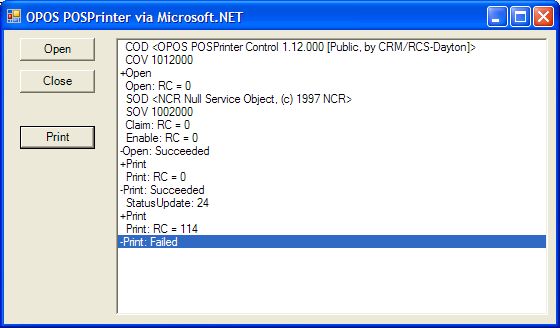
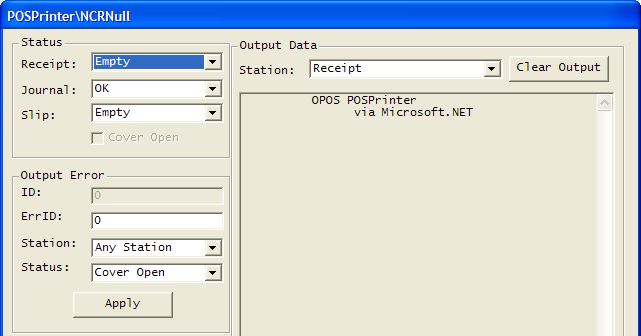
A screenshot of the POSPrinter1 sample application follows,
followed by the NCR Emulator Service Object which was used for this run. (The
emulators are not available to the public. You should substitute your own
emulators or a vendor's installed and configured device.) The following activities occur while running it: - Application startup: Instantiate the OPOS POSPrinter
assembly's class and wire the StatusUpdateEvents. Display the OPOS Common Control Object's ControlObjectDescription and ControlObjectVersion properties.
- Open: When this button is pressed, the application calls the Open and ClaimDevice methods, and sets the DeviceEnabled property. After opening the device, the application displays the ServiceObjectDescription and ServiceObjectVersion properties.
- Print: When this button is pressed, the application calls the PrintNormal method to print on the receipt station.
- On the emulator, update the Receipt Station's paper status to "Empty".
A StatusUpdate event is fired; value 24 = PTR_SUE_REC_EMPTY.
- Print when out-of-paper: The print fails with ResultCode 114 =
OPOS_E_EXTENDED. (The ResultCodeExtended is not output by this program, but
would be 203 = OPOS_EPTR_REC_EMPTY.)
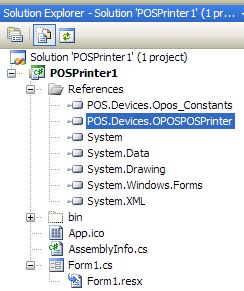
 The following screen shots are from Visual Studio
2008, with the POSPrinter1 solution loaded. The Solution Explorer shows the references, including references to the POSPrinter
and OPOS Constants assemblies:
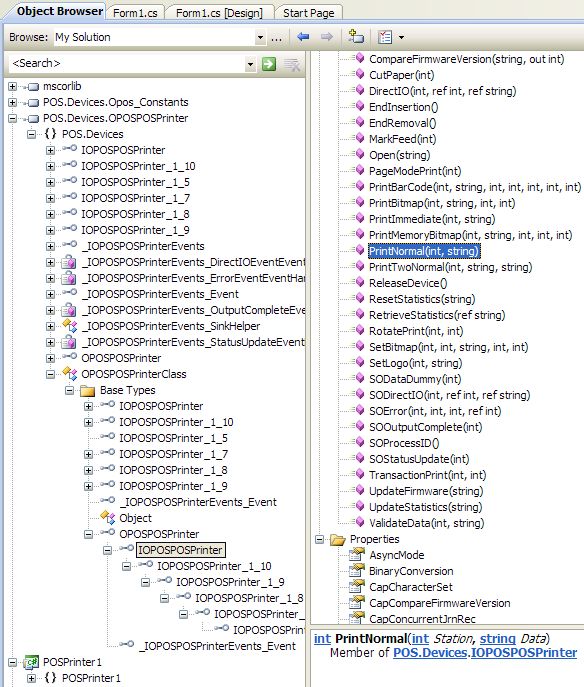
The Object Browser shows the classes and interfaces in the
OPOSPOSPrinter assembly:
Last updated:
2015-02-08 |